Self-hosting is cool! I think it especially blew up over the past couple of years, with the start of a wave of "cost recouping" for many streaming services, where they introduced ads, increased subscription prices across the board, and not to mention, just spawned too many of themselves that you ended up with a "subscription bundle" that cost way too much. But unfortunately for self-hosting, something happened last year that caused the RAM in my gaming PC to become an appreciating asset, and my "overpriced" SSD purchase from 2022 becoming a bargain find.
The consequences of the AI boom have been a disaster to my self-hosting plans. When I started to look around, I spent around 3 months dealing with the purchase of a cheap HP office PC from a seller on WhatsApp, which I shipped back (twice) because it just wouldn't boot due to some BIOS issue that I simply couldn't fix myself. In the end I spent more than the cost of the machine itself on the RAM (which it didn't come with, of course) and the shipping (twice!). Burnt by that, I vowed to just buy a new mini PC when RAM and storage pricing makes sense again. And going by how things are, I will be waiting for some time.
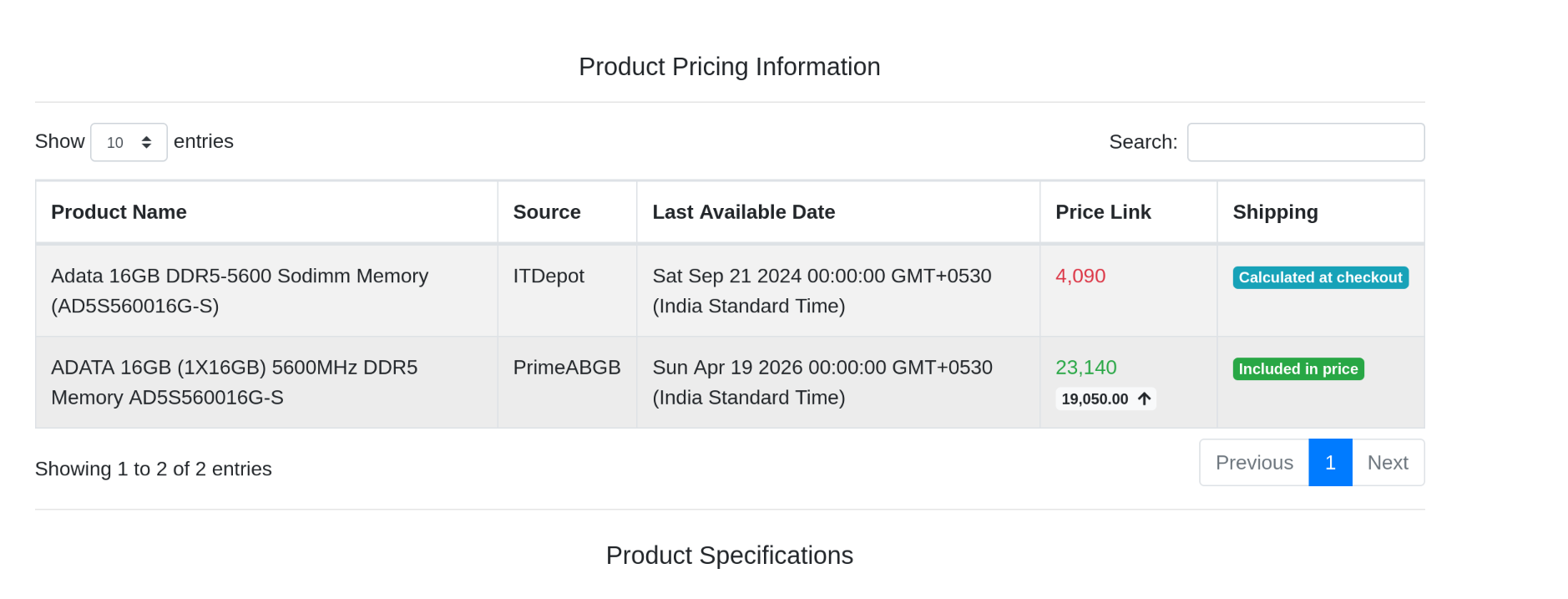 I don't exaggerate when I say that I audibly gasped when I saw this.
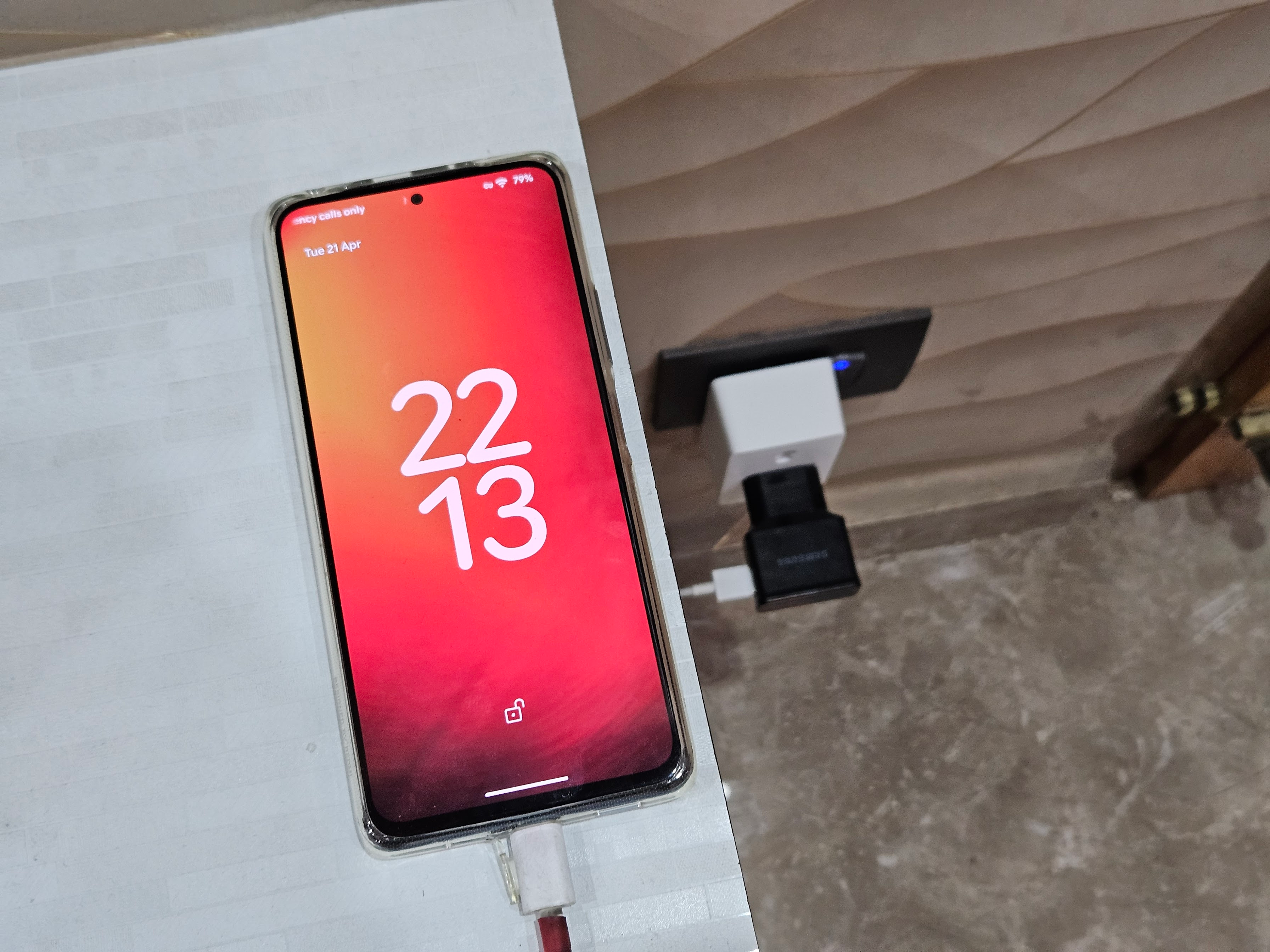
Anyway, nothing was self-hosted thus. Enter Redmi Note 10 Pro. A phone I used from 2021 to 2024, and never used without a custom ROM. It came from a time when the SD card slot was quite rare, but it had one. It was so charming to mess around and install a new Android versions' custom ROM someone else had made, and that was a really great time. Eventually though, it was time to upgrade, and I got a new phone sometime in 2024. But as soon as I upgraded, the Redmi no longer had any use. I also didn't want to sell it. I just kept it as the spare phone in your drawer that you keep for the day you need a spare phone.
As the need for a spare phone didn't arise, the Redmi collected dust. I'd charge it to 100% and just track how long it would take to discharge with just a Wi-Fi connection (almost 10 days). On one or two occasions, I would use it as a webcam to capture my desk on a Discord call, but that was all it was used for. After 18 months of that, I suddenly remembered the app Termux, that would let you use a Linux terminal, over Android. And even without Termux, there was potential here. Thus, while I figure out all what I want to self-host, I could just get started with this phone, and work within its limitations. Whatever else I need after this can come later, of course. But something is better than absolutely nothing, right?
Why do this?
If you do know what self-hosting is, you already know why.
I let the utility of the phone server make itself known. As opposed to setting up the hardware and plopping things on it that everyone else suggests; I just waited for ideas to strike and for anything sufficiently inconvenient, I'd work something out with just this phone. With the limitations of an Android phone with an emulated Linux terminal (Docker is not a realistic option, for example), it was all going to be more primitive and simple. Any programs that were specifically made to work with Termux/repackaged for it were fair game, and thanks to the several contributors to the pkg mirror of apt that Termux uses, I had many such options. I was not going to do anything taxing on the CPU/GPU for now, and that suits the platform I'm working with. No Immich, no Plex or Jellyfin, but that's fine, and here's what I got going over the last month of pondering and (some) vibe-coding:
- Torrent management. the
aria2utility lets you download things over several protocols, including BitTorrent. Combined with the JSON RPC and the AriaNg interface, you get a lightweight UI to control and manage your torrents. - Network-attached Storage. I am not made of Synology money. Or even "connect your 4TB WD MyPassport to your router" money, at this point. But having a place where you can just throw some files on that you can perhaps then download on your phone? Solid. Even better, I can stream a movie directly through
copyparty, truly one of the command-line utilities of all time (IT'S REALLY VERY GOOD). To say nothing of being able to play music or podcasts, all through copyparty. IT IS VERY GOOD, just watch this. In fact, screw this article, just watch the video before and get using copyparty to set up whatever the hell you want!- One thing that I did have to spawn separately, but for the same use case, was miniDLNA, a package that was already patched for Termux, that lets you broadcast your device and its files over the UPnP protocol. This was just to connect this server to my TV, and having it work "natively" instead of navigating to the copyparty page using the TV's Web browser, and playing content from there. Also a godsend. I also figured out that it's pretty feasible to rewrite the SSDP component of copyparty (which is meant for drive discovery over Windows PCs) to support DLNA too. I will contribute that to copyparty soon, and add another feature to that Swiss Army Knife of a tool.
- Obsidian Vault. I don't use Obsidian as much as more avid users, but having it synced across devices is a great thing to encourage my use of it. With the theme being self-hosting, I wasn't going to use Google Drive or something else for the vault, although it's pretty convenient to set that up too. I'm actually writing this on my syncing-every-15-seconds-to-my-phone-server Obsidian Vault! There was some specific setup that the Obsidian folder needed, but I have covered it below, and that makes copyparty work for Obsidian too!
In the past, parts of this were handled either by my PC, or I could just store stuff on my main phone. I downloaded stuff via BitTorrent* on my PC and just let it be there. But the issue there was I'm letting this comparative behemoth run for several extra hours, even overnight and wasting electricity, especially with some sluggish torrents. And as for my main phone: I bought a 128GB phone in the year 2024. I am frequently out of storage. The most free space headroom I have is 15GB! So, it's good to have whatever I don't need immediately, off the phone.
*BitTorrent here refers to the protocol ONLY, not the application. That app sucks! Use Transmission or qBittorrent, folks!
It's also convenience, still. While the intent IS to reject some convenience, like downloading some media content and then keeping it for the time when you get around to watching it as opposed to just streaming it, I still want it to be not entirely a chore to turn on the PC, copy my legally-downloaded movies on my main phone, and then watch them there. Hence, it's just better to have this set up on the network without any power overhead or all the finagling around.
How?
The power of a Linux terminal is pretty great here. It both gives you a lot of extensibility, with the likes of copyparty having a near-infinite list of configuration options and essential features, as well as tons of literature and reference material to go through. It also standardises your interaction with everything else. I can just SSH into the phone like I would any other computer on my network, so I don't even have to use a virtual keyboard for input, which is a really annoying way to work a terminal by the way.
There are different ways to do perhaps most of what's done here. Maybe an FTP Server via any app from F-Droid (many of those exist), plus a torrent manager app that has remote management features (also exists), and things like that. I think I wouldn't strictly hate the latter, if such an app exists, but the former sucks compared to what all copyparty can do for you.
Broadly, to get started, here is what you need to do:
- Termux, of course. Downloaded from F-Droid, the Google Play version can have some issues. Termux uses
pkg, and you can use it to install any packages as needed. - SSH set up for Termux. I preferred OpenSSH, though I don't think it matters. For the first time, you will have to set a password on the phone using
passwd, but after that, passwordless would be great, especially if you are working with a coding agent. Your username is randomly assigned by Termux, which you can note withwhoami. Note here that Termux runs an SSH connection over port 8022, which you can specify with the-pflag.ssh -p 8022 a0_xxxx@192.168.xxx.xxx - Of course, having a DHCP Reservation from your Wi-Fi router's settings to permanently reserve a local IP to the phone would be nice. Very much like you would for literally any other server, so that you set up tooling and scripts, browser bookmarks, etc. assigned to just the one IP.
tmuxlets you have persistent sessions even after SSH disconnects, making sure your server is always-online whenever there is a local network connection. Also lets you split the terminal session so that you can run multiple things at the same time. Very useful here with Termux.- Lastly, some more Termux-specific things are downloading Termux:Boot and running it once to set it up to make Termux run on boot. And using
termux-setup-storage, you can make Termux's storage visible to the phone and making working with it easier
0. Termux and its Quirks
Now, Termux is a non-standard environment, as it is emulating a proper Linux shell within the constraints of an Android filesystem. Thus, you will have some "weird things" to contend with like where files are stored, how to keep Termux alive without Android interfering and killing the process because it went into "deep sleep" for battery optimisation, as it does with all apps, as well as how to make sure Termux starts on boot with the processes you mean to run on this phone server. Here's a checklist you can work through for this:
- As said before, Termux:Boot acts as a plugin to run services running on Termux, on boot. You will need to open the app to set it up.
- Whatever is the most unrestrictive battery management exception for Termux and Termux:Boot on your flavour of Android. This just varies from device-to-device, and you can use the ever-useful dontkillmyapp.com as your resource to get help.
- Installing
termux-toolsusingpkggives youtermux-wake-lockandtermux-setup-storage, both useful tools for what we're set out to achieve. A wake lock will let your app stop the phone from going to sleep and thus keeping the server always-active. termux-setup-storagewill set up symlinks within the Termux "home" directory, to your main storage. This will let you choose routes and paths for your files that can be seen with a file manager app too. You'd want to set up many symlinks after that too, to get all your folders sorted out, especially if you have expandable storage available on the phone.
1. Aria2
Aria2 is primarily a lightweight command-line utility for downloading files over the Internet. It supports several protocols and notably for us, it supports BitTorrent downloads via magnet links. It's headless and requires no configuration to start, just by using:
aria2c "magnet:?xt=urn:...."
It still has many configurable options, of course, but most importantly, you can set up an RPC interface like AriaNg to make remote management very easy over a browser UI. AriaNg is just a self-contained .html file, thus it's also hosted over copyparty. You can use nginx instead too, if you don't care for copyparty.
Here is my aria2 config, for reference. Standard BitTorrent management stuff. If you have a clear goal of setting up a seedbox, you can expand on this configuration a lot more and get more out of aria2, but my goal was just downloading and consumption, after a point.
2. copyparty
My glorious all-in-one tool touches every other application on the server. You explore the file server with it, you connect over WebDAV with Obsidian to sync vaults across devices, AriaNg itself is hosted over it, and of course, any file management on the server I do is easiest done over copyparty. One particular highlight is very robust upload handling, so I can upload files without worrying about redoing the whole upload if there is a failure. This is especially good for huge files that the phone doesn't really like to write so fast. Here's my config
For the future, any file management and related workflows, I wish to stick to copyparty for them all, so that I don't spin up too many other services that are unnecessary. For example, setting up a separate WebDAV server is not necessary, which I did do in the past for Obsidian. And I'm not covering it in this writeup, but I did even use WebDAV on copyparty to host my music library. This is for later, though
3. miniDLNA
Specifically for DLNA-based devices, which includes just VLC Media Player, and absolutely any TV with Internet connectivity. Someone has already used this on their phone, which is why I was able to find it on pkg and setting this up was super easy too. Would still be better to have DLNA over copyparty, which I am working on myself.
These were all the components I needed to set up my Phone server and make it incredibly useful over my daily life. I've watched an unbelievably high number of movies over the past month and half of using this server, without having to stream them over the internet over a service that compresses the hell out of the video, or having to struggle with a USB drive to play them over the TV, or even save and keep them over a phone (I can stream over VLC!). And while I'd still hold out hope for the memory shortage to blow over and build a very nice media server with more capabilities, this phone setup is awesome!
 No, seriously!
I do have future plans here, and some of them I've already put in place because I stalled on writing this article for so long:
- To save its battery from frying itself over time as it's always plugged in, using a smart plug controlled by the phone itself to charge at 75% and stop at 80%. Already done this with a TP-Link Tapo P110, and the PyP110 Python library, and the plug gracefully starts and stops at the required times (happens like twice or thrice a day).
- Music library management! This was part of a popular HN post I read from 2023, but also, self-hosting your music library is a pretty common idea. I wish to stop using Spotify by the end of this year, and support some indie artists that I have really liked over the years, monetarily, by buying their discographies over Bandcamp. Also already done, but it deserves a followup post.
- Tailscale - already running! I streamed a movie from my server phone, through Tailscale, over a different Wi-Fi network, when I was away from home.
- And the most ambitious, trying to see how much horsepower this phone can muster for me to run a local LLM on it, and help me out for specific tasks. LLMs-on-the-edge, essentially. I want to use it as a notes organising RAG, but it deserves a lot more time so I'll cover it in a separate piece.
I'd encourage everyone with a spare phone in a drawer problem to try this out. Whatever you want to do with it, just try it out!